
Every Monday morning, a scheduled Claude task finds last week's SaaS receipts in my inbox, skips the ones I've already sent, forwards the rest to our accounting intake address, and tells me what it left alone.
It took over my lowest-value recurring chore, and the one I was worst at. It's also the simplest of the five to build, so it's the one I'd suggest starting with.
The problem
About a dozen tools bill the company card each month, and each one emails a receipt. Accounting has an intake address that turns a forwarded receipt into an expense record, which works well as long as someone forwards the receipts.
I didn't. They'd pile up for weeks, and then I'd spend a Friday searching for "receipt," forwarding them one at a time and losing track of which ones I'd already sent.
The only judgment in the whole job is whether an email is a receipt for a company purchase. When that isn't clear, the email should come to me.
At a glance
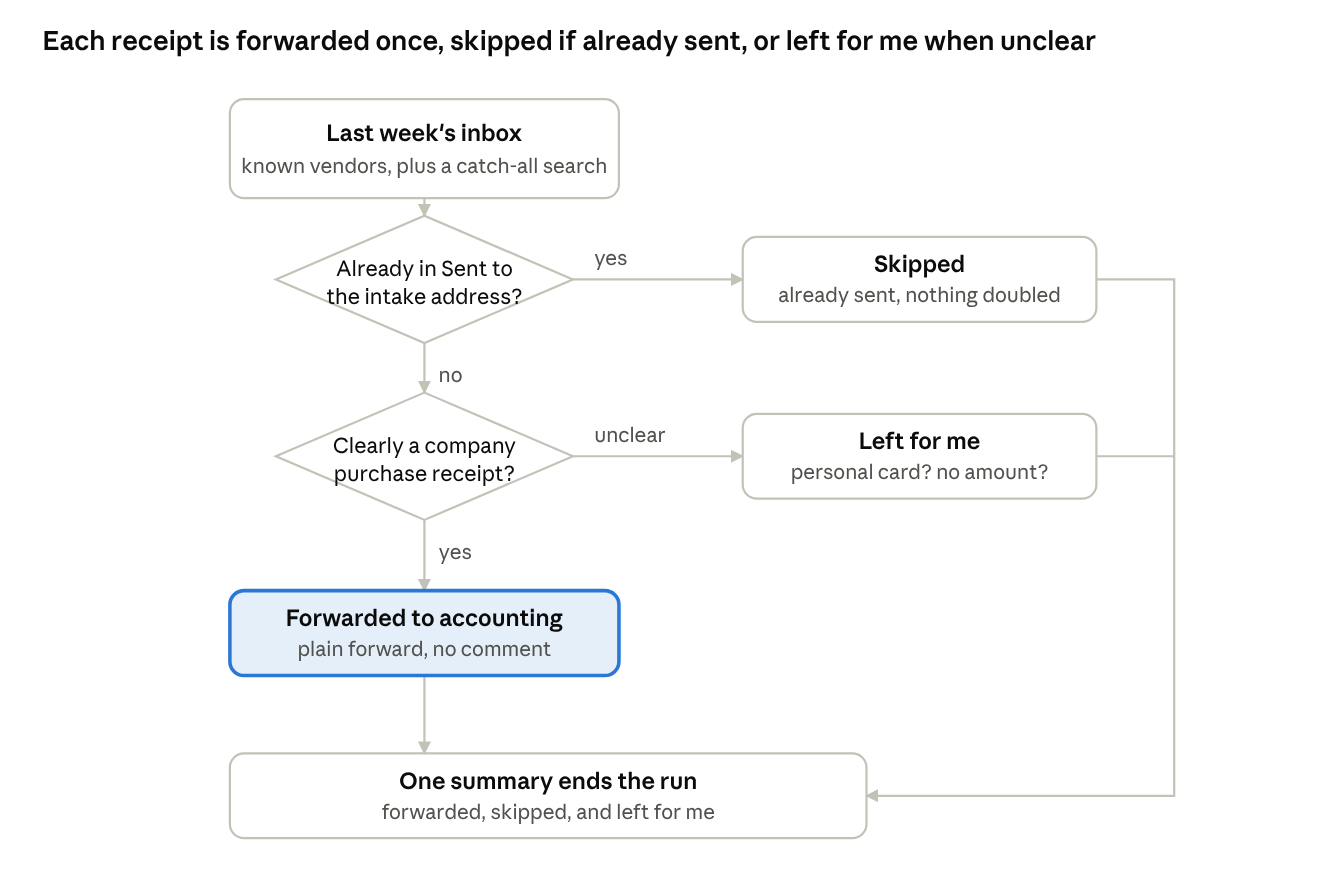
Expense forwarding flow: 2 decisions, 3 outcomes
Every candidate receipt gets two checks: was it already forwarded, and is it clearly a company purchase? A receipt has to pass both to be forwarded. Anything else goes in the report for me to look at.
How it's built
The task runs Mondays at 9:00 AM Eastern and covers the previous Monday through Sunday. Weekly is often enough that accounting never waits on me, and each run still has something to do.
It uses the Gmail connector with send permission. My first version used a read-only connector, which could find receipts but couldn't forward them, so I got a to-do list instead of a finished job.
The prompt runs one search per known vendor, each pinned to the exact sender address. Several vendors bill through Stripe, and their receipts come from addresses that differ only by an account identifier. That identifier is more reliable than the subject line, which changes. A catch-all search for "receipt" or "invoice" in the subject runs last, leaving out the known senders and anything that looks like marketing.
Before forwarding, the run searches my Sent mail for messages to the intake address and compares transaction-specific evidence, such as a receipt or transaction identifier, or a combination of vendor, transaction date, amount and currency. It skips a receipt only when that evidence clearly matches; if a match is uncertain, it leaves the receipt for me to review. That check is what makes it safe to re-run without discarding a new charge just because a vendor reused a subject. Each remaining receipt goes out as a plain forward with no comment, because the intake system parses the original email.
The run ends with three lists: what it forwarded, what it skipped as already sent, and what it left for me. I'm proudest of that third list.
A run, step by step
A run takes under 30 seconds:
- Set the window to last Monday through Sunday.
- Run one search per known sender.
- Run the catch-all for receipt and invoice subjects, minus the known senders and marketing, keeping only company purchases.
- Drop anything already in Sent to the intake address.
- Forward the rest as plain forwards.
- Report what was forwarded, skipped and left for me.
In a normal week that's four or five forwards, one skip, and zero or one item for me. About once a month a new vendor turns up in the catch-all, and I decide whether to add it to the known list.
What it looks like
This mock-up of a Monday summary uses made-up vendors. It's the only thing I read from this routine, and most weeks I only look at the third section.
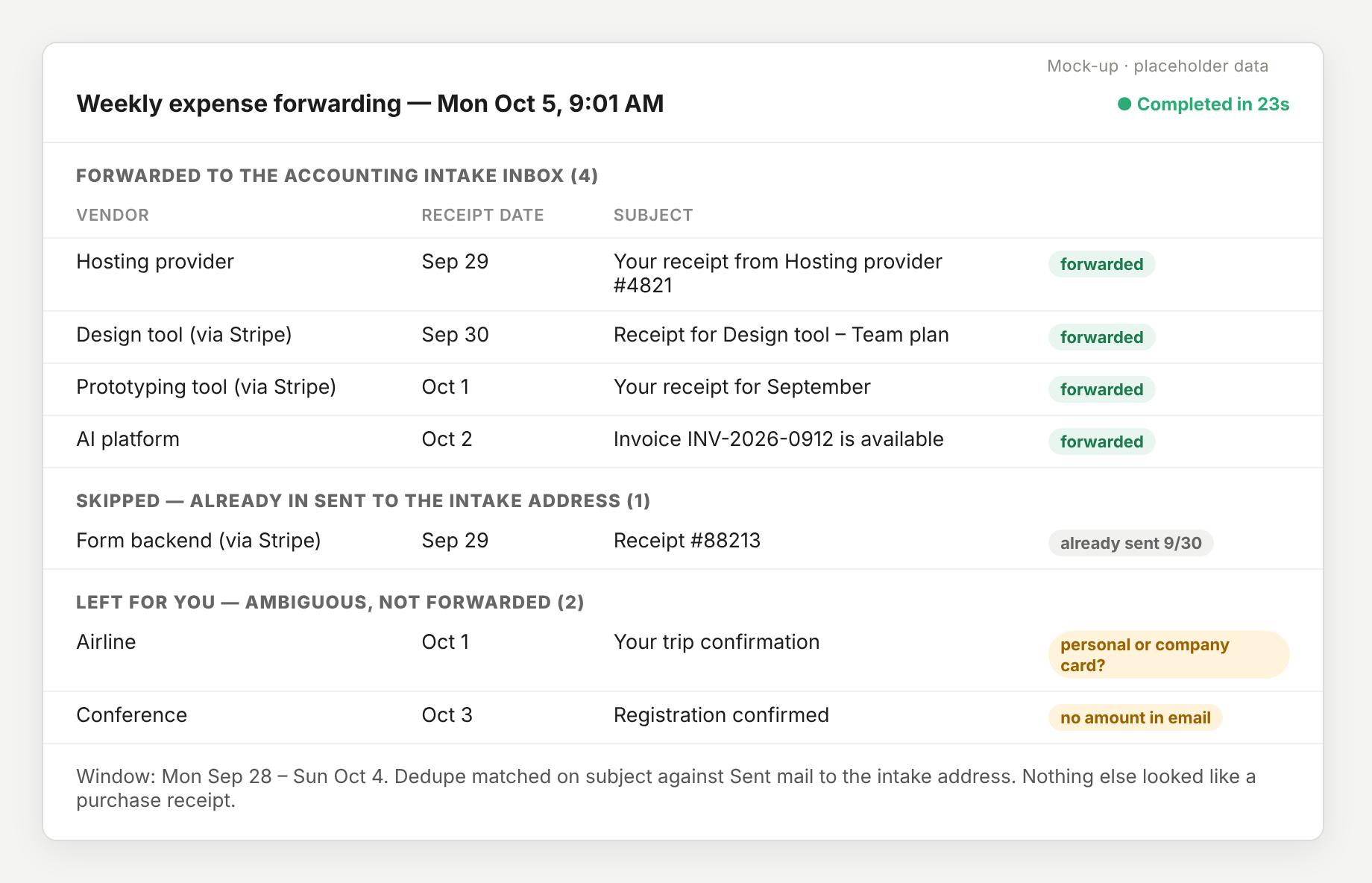
Mock-up with placeholder data
If that third section ever gets long, I'll take it as a sign the search rules need work.
What I learned
Pin searches to sender addresses, which almost never change.
Build in re-run safety first. The dedupe against Sent mail is what let me stop watching the runs, and I'd put the same check in any routine that sends or writes something.
Read-only connectors make good prototypes. The first version could only hand me a to-do list, which gave me a few weeks to confirm its judgment before I let it act.
The "left for me" list changed the run more than any other instruction. Once the prompt said ambiguous items should be reported, the run stopped trying to be complete and got more accurate.
Plain forwards work best. I once had it add a helpful note to each forward, and the notes only made accounting's side harder to read.
The template
This is the shortest of the five prompts. Attach Gmail with send permission, schedule it weekly, and fill in the placeholders.
Forward any unsent company credit card receipts for the past week to our
accounting intake address. Follow this exactly:

1. Determine the previous calendar week's date range (Monday through Sunday).

2. Search my Gmail ({{EMAIL}}) for receipt and invoice emails received in that
   week. Run these searches:
   - from:{{VENDOR_1_SENDER}}
   - from:{{VENDOR_2_SENDER}}            ({{VENDOR_2_NAME}}, bills via Stripe)
   - from:{{VENDOR_3_SENDER}} subject:receipt
   - ... one line per known vendor ...
   - Generic catch-all: subject:("your receipt from" OR receipt OR invoice),
     bounded to last week, excluding the senders above and excluding
     newsletters and marketing. Use judgment: only actual purchase receipts
     for the company card.

3. Dedupe: search in:sent to:{{INTAKE_ADDRESS}} and compare each candidate with
   receipts already forwarded there using transaction-specific evidence such as
   a receipt or transaction identifier, or a combination of vendor, transaction
   date, amount and currency. Skip only clear matches. If the evidence is
   incomplete or conflicting, do NOT forward the receipt; include it in the
   manual-review list.

4. Forward each remaining receipt to {{INTAKE_ADDRESS}} as a plain forward with
   no added comment.

5. Finish with a summary: vendor, date and subject of each receipt forwarded;
   anything skipped as already sent; and anything ambiguous you found but did
   NOT forward, so I can handle it manually.
If your accounting system has no intake address, change step 4 to "save the attachments to a shared folder" and leave the rest as is.
This post is part of a series: Five Claude routines that run my week.